Hero Health's Consultation lite is an embeddable element that lets you capture consultations directly within your application and save them to a patient's EMIS or TPP record. Rather than building your own clinical note-taking system, embed our proven consultation component and go live in hours.
Pass patient and practice context into the React component on open, optionally prepopulate content programmatically, and let users review and save — all without leaving your application.
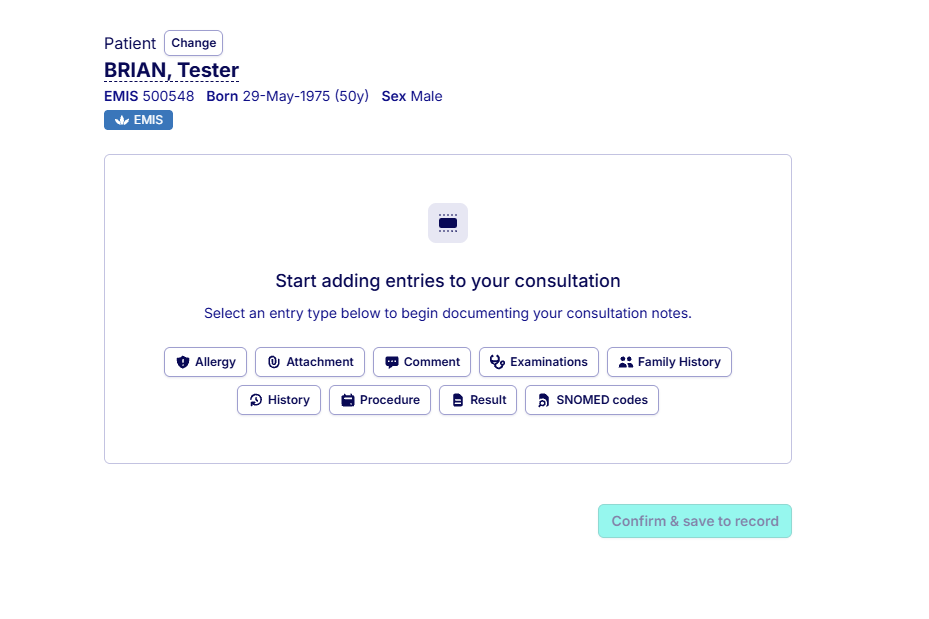
Capture quick, plain-text notes ideal for brief clinical comments. Optionally attach a SNOMED code to ensure the entry is clinically coded and meaningful within the patient's record.
Use customisable templates to collect structured clinical data — including observations such as blood pressure, height, and weight — which update the coded data within the clinical record. Templates support text fields, file uploads, radio buttons, checkboxes, and individual SNOMED codes.
Prepopulate consultation content via the API before presenting it to the user. This opens up numerous use cases — from AI-assisted note generation to automated clinical workflows — where the user reviews and confirms before saving.
Consultations are written directly to the patient's EMIS or TPP record in real time. Structured observations update coded clinical data, ensuring the record is always accurate and up to date.
- Speed to market - Embed a fully functional consultation feature without building from scratch.
- Reduced development effort - Leverage Hero Health's pre-built component to add clinical note-taking efficiently.
- Flexible use cases - From quick free-text notes to structured templates with coded observations, adapt to your workflow.
- Seamless integration - Pass patient and practice context into the component and prepopulate content programmatically.
- Compliance and security - Built to integrate with NHS systems, ensuring compliance with industry standards.
- Embed the element - Add the consultation lite React component to your application, passing in patient and practice context.
- Prepopulate (optional) - Use the API to prepopulate consultation content before the user opens the element.
- Capture consultation - The user reviews the content, selects entry types (e.g., allergy, procedure, result), and adds or edits as needed.
- Save to patient record - The consultation is written back to the patient's EMIS or TPP record, including any structured coded data.
- Set up Elements in your project
- Authenticate your Elements with short-lived Access Tokens
- See the API reference to prepopulate consultation content
- Contact us to discuss your integration requirements